
OpenBSD on a virtual 80386
I've been playing with 86Box and wondered how well OpenBSD would run on old hardware. 86Box is a fork of PCem, a low‑level PC emulator, and provides an array of late‑80s and early‑90s virtual hardware to experiment with. While OpenBSD is not supported on the 80386 anymore, I wanted to take a look at an older version to see how much had changed.
Setting up on the 80486
Before jumping into the 386, I started with an Intel i486DX2/66, 64 MB of memory, and an AMI 486 clone motherboard. The 486 is the oldest x86 processor still supported by OpenBSD as support for the 386 was dropped in May 2007:
Remove support for 80386 processors. Apologies if you have one of the rare 80386‑based system with enough memory, a 387 FPU, a usable disk subsystem, and the patience to wait for it to unpack the distribution .tgz files.
— undeadly.org
I created two 4 GB disk images and booted MS‑DOS 6.22 to get access to fdisk and format. I formatted the second disk then loaded the image into an interesting Japanese disk‑image editor, DiskExplorer. The tool is straightforward to use and allowed me to copy the install sets straight from a locally mounted copy of install65.iso, though I did need to specify the CHS values to see the FAT partition.
FPU panic
With the files copied, I booted up floppy64.fs and tried to take a look at the disks with disklabel but encountered a panic:
panic: npxdna vector not initialized
syncing disks... done

dumping to dev 1101, offset 0
dump area unavailable
rebooting...
npx is the Numeric Processing Extension, a driver for the FPU and an FPU emulator if a real one is not present, and dna is Device Not Available. This was interesting because the 486DX has an integrated FPU and the BIOS correctly detects it, but there may be an issue with its emulated implementation in regards to what OpenBSD is expecting. I ran into the same panic using an Intel i486SX with and without coprocessor, as well as on the Cyrix Cx486DX4/100. Without wanting to dig too much deeper I switched the CPU to an AMD Am486DX4/120 and was able to access the disks.
The npx(4) source can be viewed on GitHub if you're interested.
Freeing resources
At this point it was just a regular OpenBSD install using the sets I copied to the second IDE disk. It took quite a while to relink the libraries and generate the SSH keys on first boot. Even more excruciating was the automatic kernel reordering which soaked up much of the CPU. I let it run in the background for about 20 minutes before giving up and rebooting. I commented these lines out of /etc/rc to preserve my sanity while testing:
# reorder_libs
# /usr/libexec/reorder_kernel &
These functions provide additional security on a real system, so I wouldn't suggest doing this otherwise. I also disabled a few daemons to free CPU and memory:
# rcctl disable slaacd   # Has anyone run IPv6 over ISA yet?
# rcctl disable smtpd    # I won't be reading much mail
# rcctl disable sndiod   # PC beeps are all I need
This gave the system some room to breathe while trying out different pieces of emulated hardware. Here's top(1) running on a CGA display in 80×25 text mode:
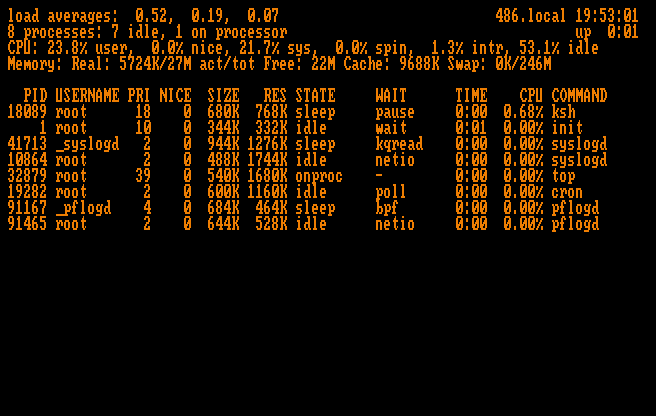
load averages:  0.52,  0.19,  0.07
8 Processes: 7 idle, 1 on processor
Memory: Real: 5724K/27M act/tot Free: 22M Cache: 9688K Swap: 0K/246M
22 MB free and we're not even swapping! Let's try 32 MB of total memory:
Memory: Real: 5052K/16M act/tot Free: 964K Cache: 3248K Swap: 804K/246M
At least we still have more than 640 kB, which ought to be enough for anybody. How about 16 MB?
panic: pmap_enter_86: PG_PVLIST mapping with unmanaged page
Oh well.
Loading the OpenBSD 4.1 sets
Next I needed to make the 4.1 install sets available within the VM. I wanted to try something other than using a disk‑image editor to load the sets, so I looked into using an emulated CD‑ROM drive and opted to use SCSI instead of ATAPI.
Virtual SCSI CD-ROM
I didn't find any supported ISA SCSI adapters, so I switched the motherboard to a Mtech (Rise) R418 which has a PCI bus. I selected the NCR 53C810 which is supported by the siop(4) driver. The machine wouldn't fully POST with the CGA card installed, so I also switched to VGA at this time.
The system boots fine and can access the CD‑ROM drive. I located an archived copy of 4.1 but the directory didn't contain the usual installXX.iso, so I downloaded the sets individually and compiled them into an ISO using BurnAware Free. The ISO was loaded into the VM and at 2× speed the transfer took about 20 minutes to complete. I worked on other things while waiting for my emulated 486 to shuffle a 12‑year‑old copy of OpenBSD across a virtual PCI bus.
Installing OpenBSD 4.1 on the 386
I issued halt, powered off the 486, and backed up the disk image. I reconfigured 86Box with an AMD Am386DX/40, 32 MB of memory, and an Award 386 DX clone motherboard. The boot floppy worked fine and I was greeted with a message from the kernel upon it seeing the current date:
WARNING: file system time much less than clock time
Welcome to the future, 4.1!
4.1 was able to read and write to the FFS2 formatted drive I created in 6.5 with no issues. All of the familiar ramdisk tools were there including some I hadn't come across before, like disknames which prints out a list of the installed disks.
The installer was a little more cautious in 2007, warning of data loss and making sure you're certain you want to proceed.
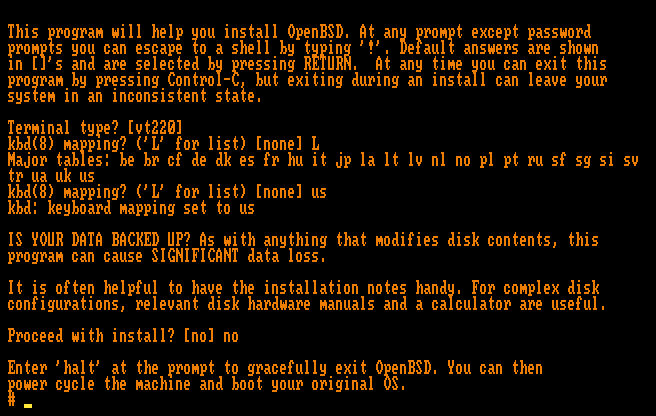
In all it took over an hour to install 4.1 on the 40 MHz Am386DX, including all of the X sets. After first boot the key generation was especially slow. It took longer to generate the DSA, RSA, and RSA‑1 keys on the 386 than it did to generate the modern equivalent and relink the libraries on the 486.
Here is top(1) on the freshly booted 386:
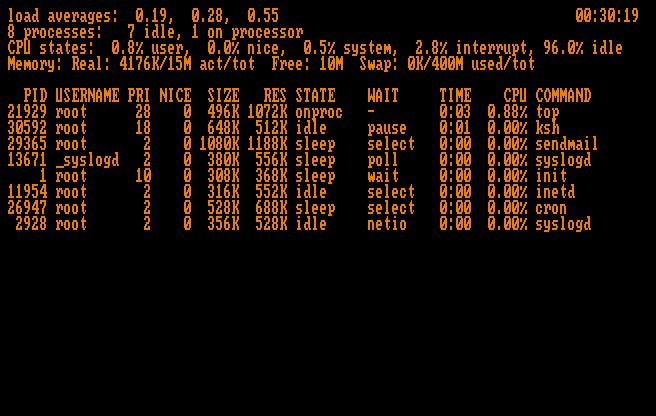
We have quite a bit of free memory, 10 MB, which is about 9.5 MB more than we had under 6.5 given the same physical memory. Could we go lower?
24 MB – OK
How about the 286?
Could OpenBSD run on a 286? OpenBSD was originally forked from NetBSD which is known for running on just about anything, including toasters. However, not even NetBSD supports the 286. An archived email from July 2000 summarizes:
I am not aware of any existing work for the 80286 – I believe the somewhat braindamaged protected mode may be the largest hurdle.
— netbsd.org
Conclusion
It was fun to explore 86Box and see how well OpenBSD could work within its confines. As it turns out, it works pretty well, it's just slow. Really slow. But that's just the hardware.
I anticipate this would be much more interesting on real hardware with actual use cases, some of which I have planned and will hopefully execute on some day.
Thanks for reading!